


Top 10 USB C Bulkhead Connectors for Global Buyers

A Usb C Bulkhead Connector gives equipment a convenient USB-C access point through a panel, enclosure, or cabinet wall. The part may look simple. Its performance depends on details such as panel thickness, mounting method, connector alignment, and the cable used behind the enclosure. A tight installation can strain a plug, while a poorly sealed opening may expose equipment to dust or moisture.

Global buyers also need to compare more than price. Check the product drawing, USB data and power specifications, supported charging level, connector gender, and stated sealing rating. Confirm whether that rating applies to the connector alone or to the fully assembled installation. Small differences matter. A rugged metal body may suit an outdoor instrument, while a compact plastic housing may fit a lightweight control panel better. Neither choice is automatically right.

This guide reviews ten USB-C bulkhead options for different purchasing needs, from industrial equipment to custom electronics. It focuses on verifiable product details, practical installation considerations, and questions worth asking suppliers before ordering. Where specifications are missing or unclear, treat that as a reason to request documentation rather than assume compatibility. A product listing is not a test report. Buyers should also confirm sample fit, cable clearance, and performance in their own enclosure. That step can feel slow, but skipping it may lead to costly rework. No single connector fits every project; the best choice depends on the device, operating environment, and evidence available.
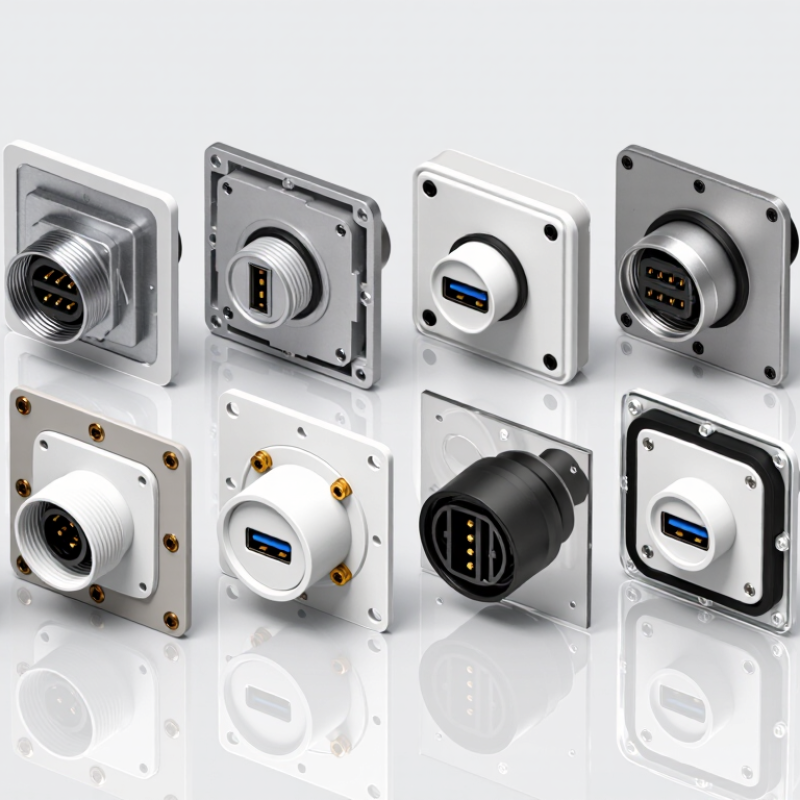
Top 10 USB C Bulkhead Connectors for Global Buyers

USB-C Bulkhead Connectors: 24 Contacts, Panel Mounts, and Core Functions

USB-C bulkhead connectors carry a familiar, reversible port through an enclosure wall. Many use a 24-contact interface, but that number alone does not confirm full support for power delivery, data rates, or alternate functions. Check the product’s wiring diagram and rated performance. A connector can look right and still limit the system.

For buyers comparing options, inspect the panel mount, cable path, and installation depth. Threaded bodies suit some panels; flange mounts may fit others. Measure the panel thickness and clearance behind it before ordering. Small details matter. A gasket can help resist dust or moisture, but only when the connector’s rating and installation method support that use. Don’t assume a sealed appearance proves protection.

Also compare current ratings, shielding, and mating-cycle specifications against the equipment’s actual needs. Some bulkhead designs use a short internal cable; others rely on a coupler. Each approach has trade-offs in space, signal integrity, and service access. I would verify the complete connection path, not just the panel port. This step is easy to miss, and connector listings do not always make the limits obvious.

Power and Data Benchmarks: USB PD 3.1 at 240 W and USB4 at 80 Gb/s

For global buyers comparing USB-C bulkhead connectors, headline numbers deserve careful reading. USB Power Delivery 3.1 can support up to 240 W under Extended Power Range conditions, but a connector alone does not guarantee that output. The source, cable, device, and thermal design must all support the same power profile. At a workbench, a 240 W load can warm a compact panel feedthrough quickly. Heat matters. Check contact resistance, conductor size, sealing method, and stated temperature rise. Ratings should include test conditions, not just a bold wattage figure.

USB4 at 80 Gb/s is similarly a system-level benchmark. Signal integrity depends on connector geometry, differential-pair layout, shielding, cable length, and assembly quality. A bulkhead joint adds another transition, so ask for validated performance across the complete installed path. Look for compliance results where available, plus clear limits for insertion loss and operating temperature. Test samples in the intended panel thickness and enclosure, not dangling from a lab cable. Results may still vary between installations. That limitation is worth admitting. Compare the ten candidates by documented power and data performance, then verify sealing, mating cycles, and strain relief for the actual environment.

Environmental Ratings: IEC 60529 IP Codes and Connector Cycle-Life Claims

Top 10 USB C Bulkhead Connectors for Global Buyers: Environmental Ratings and Cycle Life

An IP code is useful only when its test conditions match the installation. Under IEC 60529, the first digit indicates protection from solid objects; the second addresses water. An IP67 rating, for example, refers to defined dust and temporary-immersion tests. It does not automatically promise resistance to salt spray, repeated pressure washing, or long-term moisture exposure. Check whether the rating applies when the connector is mated, capped, or left open. The panel gasket matters, too. So do mounting torque and cable sealing. Small details, often missed.

Cycle-life claims need the same scrutiny. Ask how many mating cycles were tested and under what conditions. Was contact resistance measured afterward? Were insertion and removal performed straight, with clean contacts? Real installations may involve grit, hurried handling, or an awkward cable angle. That changes the picture. A high cycle count is not a guarantee of continued sealing or reliable data transfer. Compare test methods across suppliers, and treat vague claims cautiously. Even a careful specification can leave questions unanswered; that is worth noting before choosing a connector for a demanding enclosure.

Global Buying Criteria: USB-IF Compliance, Materials, Mounting, and Approvals

For a USB-C bulkhead connector, verify the exact assembly’s USB-IF compliance evidence, not just a “USB-C compatible” claim. Check the model’s test documentation and supported data rate, power delivery, and cable configuration. A pass-through can weaken signal integrity, especially with long internal leads. Small details matter.

Materials and mounting deserve equal scrutiny. Stainless steel resists corrosion in damp equipment, while plated brass may suit lighter-duty panels; confirm the finish fits the environment. Check panel thickness, cutout dimensions, thread engagement, and gasket compression before ordering.

IEC 60529 defines IP67 as dust-tight protection and temporary immersion in water up to one metre for 30 minutes. That rating applies only to the tested assembly and installation conditions, not automatically to every mounted connector. A tidy datasheet is not enough. Ask for test reports and installation limits.

Tips: Request the USB-IF compliance record, IEC 60529 test evidence, and applicable regional approval documents for the exact part number. Compare the connector’s stated rating with the complete device’s needs. Then test a sample on the real panel; tolerances and gasket fit can surprise you.

Top 10 USB-C Bulkhead Connectors Compared by Power, Speed, Sealing, and Use Case

Top 10 USB C Bulkhead Connectors for Global Buyers

Comparing ten USB-C bulkhead connectors means looking beyond port shape. Power, data speed, sealing, and installation space all matter. USB-IF’s USB Power Delivery 3.1 specification supports power levels up to 240 W, but a connector’s real capacity depends on its contacts, cable, and heat management. Check the assembly rating, not just the headline figure. USB-IF’s USB4 Version 2.0 announcement describes data rates up to 80 Gbps; that figure is not guaranteed for every bulkhead assembly. A short cable may still be the limiting part.

For exposed panels, IEC 60529 defines IP ratings for protection against dust and water. Compare the stated rating with the conditions the connector will actually face: spray, vibration, or frequent cable changes. A sealed cap can help, but only when fitted correctly. That matters. Rugged equipment may need a panel-mounted connector with verified sealing, while a vehicle console may prioritize compact depth and charging power. Industrial control panels often need stable data transfer more than maximum charging wattage. A spec sheet can still mislead: test the complete connector-and-cable setup under expected load. Even careful comparisons have gaps, especially when vendors use different test conditions.

Top 10 USB-C Bulkhead Connectors Compared by Power, Speed, Sealing, and Use Case
No. Connector Configuration Data Rate Power Capability Sealing Considerations Typical Use Case Buyer Check
1 USB 2.0 USB-C panel feedthrough Up to 480 Mbps Typically up to 15 W at 5 V/3 A, if the connector and cable are rated accordingly IP-rated versions are available; confirm whether the rating applies when mated, capped, or both Service ports, control panels, and low-bandwidth peripherals Check whether the feedthrough carries all required USB-C pins and supports the intended charging mode
2 USB 2.0 high-current USB-C panel feedthrough Up to 480 Mbps Up to 25 W at 5 V/5 A only when the connector, source, and 5 A-rated cable support that current Choose a gasketed or sealed design for exposed panels; protect the port when unmated Low-speed equipment that needs higher 5 V charging current Verify the connector’s current rating and cable requirements; data rate and power capability are separate specifications
3 USB 3.2 Gen 1 USB-C feedthrough Up to 5 Gbps USB Power Delivery can support up to 100 W (20 V/5 A) when the complete assembly is designed and rated for it Sealed versions exist; high-speed performance depends on the quality of the complete panel assembly Ruggedized data ports, cameras, and general-purpose equipment Confirm both the stated data rate and any USB PD rating; neither should be inferred from the connector shape
4 USB 3.2 Gen 2 USB-C feedthrough Up to 10 Gbps Up to 100 W with a compatible USB PD implementation and appropriately rated cable and connector Check whether sealing hardware affects the specified signal performance External storage, machine vision, and faster peripheral connections Look for a documented 10 Gbps rating for the assembled feedthrough, not just for the cable or device
5 USB 3.2 Gen 2x2 USB-C feedthrough Up to 20 Gbps Power depends on the assembly; USB PD can reach up to 100 W where all components support it Use a manufacturer-tested sealed assembly, since signal integrity is more demanding at higher speeds High-speed external storage and data-intensive portable equipment Verify 20 Gbps support end to end; a USB-C receptacle alone does not establish this capability
6 USB4 20 Gbps USB-C feedthrough Up to 20 Gbps Power is determined by the product’s PD implementation; up to 100 W is possible in a suitably rated design Confirm that the sealed connector and attached cable are qualified for the stated USB4 rate Compact systems requiring USB4 connectivity through an enclosure Check USB4 compatibility and the supported link rate in the assembly documentation
7 USB4 40 Gbps USB-C feedthrough Up to 40 Gbps USB PD may support up to 100 W; higher power requires a compliant EPR-capable design High-speed sealing solutions require careful cable, gasket, and mounting design High-performance docks, displays, and data-intensive systems Confirm the 40 Gbps rating for the complete feedthrough path and check the required cable length
8 USB4 Version 2 USB-C feedthrough Up to 80 Gbps; up to 120 Gbps in one direction for supported asymmetric operation Up to 240 W is possible with USB PD EPR when the source, cable, and connector are all rated for it Do not assume a generic sealed feedthrough supports USB4 Version 2; require explicit qualification Specialized, next-generation high-bandwidth systems Check the exact supported mode, cable requirements, and power rating in the product documentation
9 USB 2.0 bulkhead feedthrough with protective cap Up to 480 Mbps Usually intended for standard USB-C charging; confirm the specific current rating A cap can help protect an unmated port; the stated ingress rating may differ between capped and mated states Outdoor control boxes, field equipment, and ports exposed to dust or splashes Read the IP-rating test conditions and follow instructions for cap installation and mating
10 USB 3.2 Gen 1 rugged sealed bulkhead assembly Up to 5 Gbps when the complete assembly is rated for this speed Up to 100 W USB PD is possible only if the connector, cable, and PD electronics are specifically rated Some assemblies are specified to IP67 when correctly installed and mated; verify the exact conditions Industrial enclosures, mobile equipment, and installations exposed to water or dust Check panel thickness, cutout, gasket compression, mating state, and whether the ingress rating applies to the installed assembly
Comparison note: These are generic connector configuration classes, not specific product models. USB-C describes the connector form factor; actual data rate, charging power, and ingress protection depend on the complete connector assembly, cable, host, device, installation, and test conditions. USB PD power ratings are maximums for compatible systems, not guaranteed capabilities of every bulkhead connector.
Packaging machine ROI calculator

Need help figuring out if packaging automation is right for your business?


First, start with the numbers. Download our free packing machine ROI calculator to learn how long it will take for an investment in automation to pay for itself (and much more).


Free packaging automation ROI calculator