How to Choose the Best Industrial PC for Your Needs?
Choosing the right Industrial PC can be daunting. With numerous models available, understanding your specific needs is essential. Industry expert Dr. Emily Carter emphasizes, “Select an Industrial PC that resolves your unique operational challenges.” Her insight highlights the importance of tailoring your choice to fit particular requirements.
Industrial PCs are crucial in demanding environments, like manufacturing or logistics. They withstand extreme temperatures and dust. These machines often operate non-stop, ensuring efficiency and productivity. However, not every Industrial PC suits every application. It’s vital to assess your operational needs carefully.
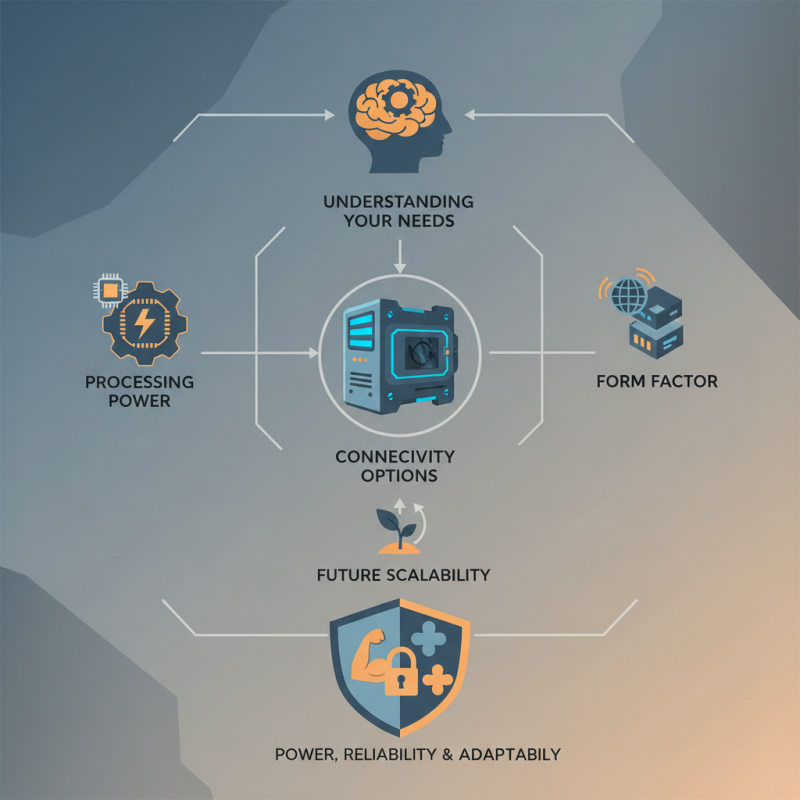
Consider factors like processing power, connectivity options, and form factor. Don’t overlook future scalability either. A choice that seems perfect today may not meet tomorrow’s demands. Reflecting on your long-term objectives is necessary. Remember, the best Industrial PC blends power, reliability, and adaptability.
Understanding the Different Types of Industrial PCs Available Today
When selecting an industrial PC, it's essential to understand the various types available on the market. Each type serves distinct functions and industries. For example, panel PCs often combine a monitor and computer into a single unit. This design is ideal for space-saving in manufacturing environments. Their touch interfaces enhance usability for operators on the floor.
Embedded industrial PCs are another common option. These are designed for specific tasks and often feature rugged designs. Their reliability in extreme temperatures and conditions is crucial for industries like oil and gas. However, they may lack the flexibility of more general-purpose systems. It’s vital to weigh these trade-offs when making a decision.
Another variant is the rugged industrial PC. These devices thrive in harsh conditions, such as factories and warehouses. They can resist dust, moisture, and extreme shocks. While they boast exceptional durability, their upfront cost can be high. Companies must consider long-term savings versus initial expense. Identifying the right type hinges on knowing the operational environment and specific needs.
How to Choose the Best Industrial PC for Your Needs?
| Type of Industrial PC | Processor Type | RAM | Storage Options | Operating Temperature | Best Use Case |
| Fanless embedded pc | Intel Atom | 2GB - 8GB | SSD, eMMC | -20°C to 70°C | IoT Applications |
| Rugged Industrial PC | Intel Core i5/i7 | 8GB - 32GB | HDD, SSD | -40°C to 85°C | Factory Automation |
| Panel PC | ARM, Intel | 4GB - 16GB | SSD, HDD | 0°C to 50°C | HMI Applications |
| DIN-Rail PC | Intel Celeron, Atom | 4GB - 16GB | SSD, eMMC | -20°C to 70°C | Control Systems |
Key Specifications to Consider When Selecting an Industrial PC
When selecting an industrial PC, several key specifications can influence your decision. Start with the processor. An adequate processor ensures smooth operation in demanding environments. Look for multi-core processors, as they handle multitasking more efficiently.
Memory is another crucial factor. Typically, 8GB is sufficient for basic tasks, but 16GB or more may be necessary for complex applications. Consider the storage type as well. Solid-state drives (SSDs) offer faster read and write speeds than traditional hard drives. This can significantly enhance the overall performance of the industrial PC.
Don’t overlook environmental factors. The industrial PC should withstand temperature fluctuations and dust exposure. Check the ingress protection rating; higher ratings mean better resistance to elements.
Finally, think about connectivity options. Multiple USB ports and Ethernet capabilities are essential for seamless integration into existing systems. Balancing these factors is important. Each application has unique demands that need careful consideration.
Evaluating Performance: CPU, RAM, and Storage Requirements
When evaluating performance for industrial PCs, CPU, RAM, and storage are critical. The CPU is the brain of the system. It runs applications and processes data. Look for multicore processors for better multitasking. A robust CPU enables smooth operations, especially in demanding environments. However, high-end CPUs may not always be necessary. Balancing price and performance is essential.
RAM is another vital component. It determines how many applications can run simultaneously. For industrial tasks, 8GB is often a minimum. However, 16GB or more may be necessary for data-heavy applications. Too little RAM can lead to slow performance. Yet, overspending on excess RAM can be wasteful. Assess your specific needs before making a decision.
Storage also plays a crucial role. SSDs offer faster read/write speeds compared to traditional HDDs. This speed can enhance system performance significantly. However, SSDs come at a higher price per gigabyte. Depending on the tasks, a hybrid solution might be worth considering. Reflect on your storage needs and budget before committing. Each decision impacts overall performance and efficiency.
Assessing Environmental Considerations for Industrial PC Locations
When considering industrial PCs, environmental factors play a crucial role. Locations often experience temperature extremes. An industrial PC must withstand both heat and cold. Humidity levels also affect performance. High humidity can lead to condensation, which damages electronics over time.
Dust and particulates are prevalent in industrial settings. Regular exposure can clog air vents and damage sensitive components. Proper enclosure design is essential. Look for dust-resistant ratings when assessing options. Vibration and shock are additional concerns. Choosing a PC that meets specific certifications for these factors ensures longevity.
Power supply stability is another critical issue. Industrial areas can face power fluctuations. A robust power management system in the PC is vital. It will help avoid unexpected shutdowns or data loss. Planning the placement of your PC is key. Ensure airflow and accessibility for maintenance. These elements require careful consideration. They help avoid future operational challenges.
Budgeting and Cost Analysis for Industrial PC Investments
When considering the investment in an industrial PC, budgeting and cost analysis are crucial. Industrial PCs can range from $1,000 to over $5,000, depending on their specifications. A recent industry report indicates that 70% of companies prioritize reliability and performance over initial purchase costs. While it may seem tempting to opt for lower-priced models, the potential for increased downtime and maintenance costs can outweigh initial savings.
Cost analysis should also include long-term maintenance. A well-chosen industrial PC can last up to 10 years, but poorly selected options may require replacement in just three years. According to a 2022 market study, companies should budget at least 20% of the initial cost for maintenance and upgrades over the PC's lifespan. This forecast helps ensure that the budget reflects the true total cost of ownership.
Tip: Always consider the end-of-life performance. A PC that meets current needs may not adapt well to future requirements, leading to further costs.
Tip: Performing a life cycle cost analysis is essential. It helps businesses make informed choices based on projected performance and longevity.
Investing wisely in industrial PCs can yield substantial returns when planned carefully. A broader perspective on costs will lead to more effective budgeting, potentially saving significant amounts in the long run.